Affichage des articles dont le libellé est ENGLISH FREEWARE. Afficher tous les articles

mercredi 16 avril 2014

VISUALSTAT

VisualStat is a comprehensive and versatile desktop statistics package that is simple for beginners, yet powerful enough for experts. It incorporates all the descriptive statistics from Average, Mode and Variance through to Hypothesis Analysis, ANOVA, Linear Regression and Multivariate procedures. All test results have an associated report which provides a short conclusion and other descriptions to assist in the interpretation. The new version introduces several changes and new features :
Enhanced DataSheet, supporting large data files (up to 2,000,000,000 rows and 2,000,000,000 columns).
Import and export files of various formats, including Microsoft Excel®.
Support OLE Drag and Drop, Formula on cells,
Principal Component Analysis, Hierarchical Cluster Analysis, Correspondence Analysis
Nonparametric Statistics, t-Test, Anova.
Descriptive Statistics, including Frequency, CrossTabulation.
Create and modify variables by using a high-performance Variable Calculator that has over 500 statistical, financial, logical, and other functions.
Enhanced DataChart, including 3D Bars, HiLo, Candle, Polar, Bubble.
DataChart Interaction, with Zoom, Rotate, Scale, Translate.

VIRTUALDUB

VirtualDub is a video capture/processing utility for 32-bit and 64-bit Windows platforms (98/ME/NT4/2000/XP/Vista/7), licensed under the GNU General Public License (GPL). It lacks the editing power of a general-purpose editor such as Adobe Premiere, but is streamlined for fast linear operations over video. It has batch-processing capabilities for processing large numbers of files and can be extended with third-party video filters. VirtualDub is mainly geared toward processing AVI files, although it can read (not write) MPEG-1 and also handle sets of BMP images.

lundi 14 avril 2014

PhotoFiltre Studio

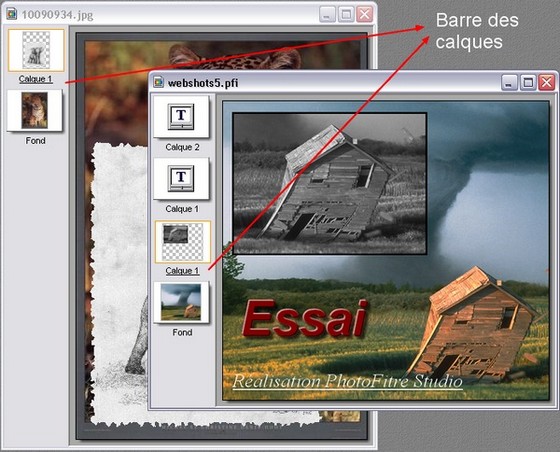
PhotoFiltre Studio is a complete image retouching program. It allows you to do simple or advanced
adjustments to an image and apply a vast range of filters on it. It is simple and intuitive to use, and 
has an easy learning curve. The toolbar, giving you access to the standard filters with just a few 
clicks, gives PhotoFiltre Studio a robust look. PhotoFiltre Studio also has layer manager (with Alpha
channel), advanced brushes, nozzles (or tubes), red eye corrector, batch module and lot of other 
powerful tools.

vendredi 11 avril 2014

Fotobounce

Fotobounce is unique from other photo management and sharing software applications. 
Here’s how:
*We scan the digital photos on your local computer disk (Windows or Mac) and then give you the most efficient and effective method for tagging those photos with the names of people that appear in the photos. Our patented technology clusters similar looking faces together to enable you to tag many faces with one click. In independent testing we were shown to be more accurate and faster at tagging than Picasa, MS Photo Gallery and iPhoto.
*We provide you with many different Album options to organize your photos in addition to the fantastic People index. Albums can be Events, Places, Collections and Keywords.
*You can be as private or as public as you want to be with your photo sharing. Fotobounce gives you all of these sharing options:
*Upload albums or photos to Facebook, Flickr or Twitter.
*Upload albums to the Fotobounce website and get a URL link that you can share privately via email or any other method. We delete photos uploaded to this link after 60 days so that you don’t have to worry about your photos floating around on the Interweb for ever and a day. Any photos uploaded to Twitter also follow this plan.
We allow you to create a private Fotobounce “bouncer” network. Two or more Fotobounce systems can connect together similar to Skype and share full resolution photos with each other. All transmissions of photos are totally secure with bank-grade encryption.

Photo Collage Max

Photo Collage Max is a digital collage maker which gives people the advantage to design precious collages with their own photos, images, text creatively. With built-in templates, frames, backgrounds, clipart and features of customization, users can easily design one-of-a-kind greeting cards, photo collages and calendars for memorizing life’s special moments.


jeudi 10 avril 2014

USB Device Tree Viewer 2.3.5.0

USB Device Tree Viewer is a tiny application that provides information about USB ports and hubs on a computer in a tree view format. The application, which is also referred to as UsbTreeView, is based on the UsbTreeView embedded in the Windows Driver Development Kit.
USB Device Tree Viewer provides detailed information about all the USB hubs and ports, starting with the details of the computer itself, including its name and version of operating system used.

When you click on a name on the left pane, relevant details about it will be displayed on the left pane. It uses different symbols to distinguish connected devices from those that are not connected. You will get detailed information, which is listed into different categories, including device information, descriptor, capabilities and statistics.

In addition, right clicking on any device name provides more options, including the ability to restart device or port, perform safe removal and see device properties. If a given device does not work properly, this is where you will determine the cause of its malfunction.

Source : http://www.freewarefiles.com/

ProduKey v1.65 - Recover lost Windows product key

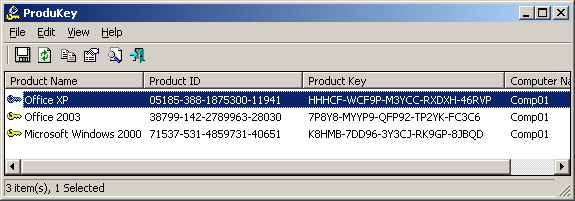
ProduKey is a small utility that displays the ProductID and the CD-Key of Microsoft Office (Microsoft Office 2003, Microsoft Office 2007), Windows (Including Windows 7 and Windows Vista), Exchange Server, and SQL Server installed on your computer. You can view this information for your current running operating system, or for another operating system/computer - by using command-line options. This utility can be useful if you lost the product key of your Windows/Office, and you want to reinstall it on your computer.

jeudi 13 mars 2014

System Optimize Expert


Systeme Optimize Expert is specialised in 
• Overall scanning & repairing
System Optimize Expert's reliable scanning covers your entire system, giving your PC the full-scale protection by repairing all the errors: invalid registry entries, system problems and so on.
• System improving
Acting as your private doctor, System Optimize Expert is capable of offering professional diagnosis and treatment to ensure a stable and smooth system and keep it at peak performance.
• Offering the easiest operation
You need not to be a computer talent to handle all its functions, as running System Optimize Expert is as simple as ABC. Try it, you will be totally impressed by its neat interface and solid features.
• Free version available
Not just trial version. It's 100% free for your lifetime usage and upgrades. The scan, repair, optimization, etc. are also available.
• Automating protection
Enable the Automated Scan and Sweep, and you can also set a schedule of when and how often System Optimize Expert is about to launch. So you can enjoy the real-time protection without your trouble of clicks.
Source :http://www.systemoptimizeexpert.com/

Any Video Converter


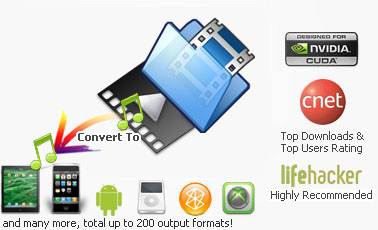
Any Video Converter Professional is an All-in-One video converting tool with easy-to-use graphical interface, fast converting speed and excellent video quality. It can convert video files from mpg, avi, divX, mpg, vob, wmv (Windows Media Video formats), 3gp (mobile phone format), asf, mov, rmvb and more into mp4, avi, mpeg and wmv files. If you have iPod, iPhone, Zune, PSP, Apple TV, PS3, Archos, Walkman, Sandisk Sansa, iRiver PMP, Creative Zen, Wii or Xbox 360, Any Video Converter is right for you! You can also and convert YouTube videos and Google Videos.

With Any Video Converter you can convert your video files into the formats you need to watch on TV, put on a website, create a presentation, watch on your iPod and much more.

R-Studio

R-STUDIO is a family of powerful, cost-effective disk recovery software. Originally developed by R-Tools Technology, Inc. for experienced data recovery professionals, R-Studio has been redesigned as a scalable, user-friendly all-in-one data recovery tool. By coupling our most advanced file recovery and disk repair technology with an intuitive user-interface, R-Studio provides enterprise and professional-level data recovery specialists the tools they need without hindering the experience of entry-level users.


Source : http://www.r-studio.com/ 

samedi 1 mars 2014

WnBrowse


WnBrowse is a program that allows you to quickly view and print the contents of your computer files in a text or hex format. This is the first Windows program I ever wrote, some 22 years ago, but I still use it almost every day.

HexBrowser

HexBrowser is a tool that identifies file types. It does not care about the file extension, but opens each file to look for signatures so it can determine the exact type of a file. It now recognizes more than 800 different file formats.
HexBrowser shows detailed information about each file, or a hex- or text dump of the beginning of each file (for the sake of speed).

Python

Python is a widely used general-purpose, high-level programming language. Its design philosophy emphasizes code readability, and its syntax allows programmers to express concepts in fewer lines of code than would be possible in languages such as C. The language provides constructs intended to enable clear programs on both a small and large scale.
Python supports multiple programming paradigms, including object-oriented, imperative and functional programming or procedural styles. It features a dynamic type system and automatic memory management and has a large and comprehensive standard library.

Code Blocks

Code::Blocks is a free C, C++ and Fortran IDE built to meet the most demanding needs of its users. It is designed to be very extensible and fully configurable.
Finally, an IDE with all the features you need, having a consistent look, feel and operation across platforms.
Built around a plugin framework, Code::Blocks can be extended with plugins. Any kind of functionality can be added by installing/coding a plugin. For instance, compiling and debugging functionality is already provided by plugins!

Cacheman

Cacheman is easy enough for novices to use, yet powerful enough for advanced users. Plus it offers an automatic backup feature to keep you on the safe side. Cacheman is designed for speeding up Windows 7, XP, Vista, and Windows 8. Cacheman is available in English, German, French, Spanish, Japanese und 14 other languages.

Clipboard History

 With Clipboard History, a Windows Clipboard manager, you can access up to twenty texts previously copied to the Clipboard, using the usually idle Caps Lock key, a tray icon, or a hotkey of your choice, which will work in every Windows application. When the key is pressed, a menu of saved texts will be shown. Select a text from this menu with the keyboard or with your mouse and it will be pasted to the current application. 

Linkman

Linkman (short for Link Manager) is a complete bookmark manager that efficiently organizes large numbers of links. Linkman integrates with Firefox, Internet Explorer, Google Chrome, and Opera browsers. Support to synchronize Bookmarks between browsers and among computers is also available. With a screenshot-based tutorial, an introduction video, and a comprehensive PDF manual, getting started has never been easier 

GetDiz

GetDiz is a Notepad replacement that offers a wide range of features while maintaining incredible speed, ease of use, stability, and small size. The user interface is handy, small, specific, and configurable. With GetDiz you also get enhanced functionality with DIZ and NFO files, which are often included in ZIP and RAR archives. An optional USB-Stick installation is also possible. 

StartEd

StartEd is a Windows application that helps you to change startup configuration including programs and System Services from startup folder and the registry. You can safely disable or uninstall startup programs directly from StartEd. Are you unsure about disabling specific startup programs? StartEd recognizes startup programs that are either obsolete or memory hogs, and has you covered with a backup feature. You can safely disable such items to increase your computer's performance. 

Batchrun

With Batchrun you can create a batch file using a graphical interface. A batch file lets you run several Windows commands together, in whatever order you choose. For example, you can launch multiple Windows applications with a click. Start Batchrun, add the applications you would like to run together or one after another, then select "File | Save to Desktop" and you have just created your first batch file. Double-clicking this batch file on the Desktop will start all the programs you have selected. 
 Source : http://www.outertech.com/